INSTRUMENTS / GENERATORS
Instrument / Generator Plugins
Channels and instruments: Each channel in FL Studio contains one instrument plugin. Instruments are usually synthesizers or sample players, used to create the melody and percussion in a song. FL Studio supports the VST, AU (macOS) and FL Studio's own native plugin formats. Native instruments are the most flexible with 'per note' slides and Right-Click automation linking. The Channel settings Mixer track selector (shown below) determines the Mixer track routing for the selected Instrument.
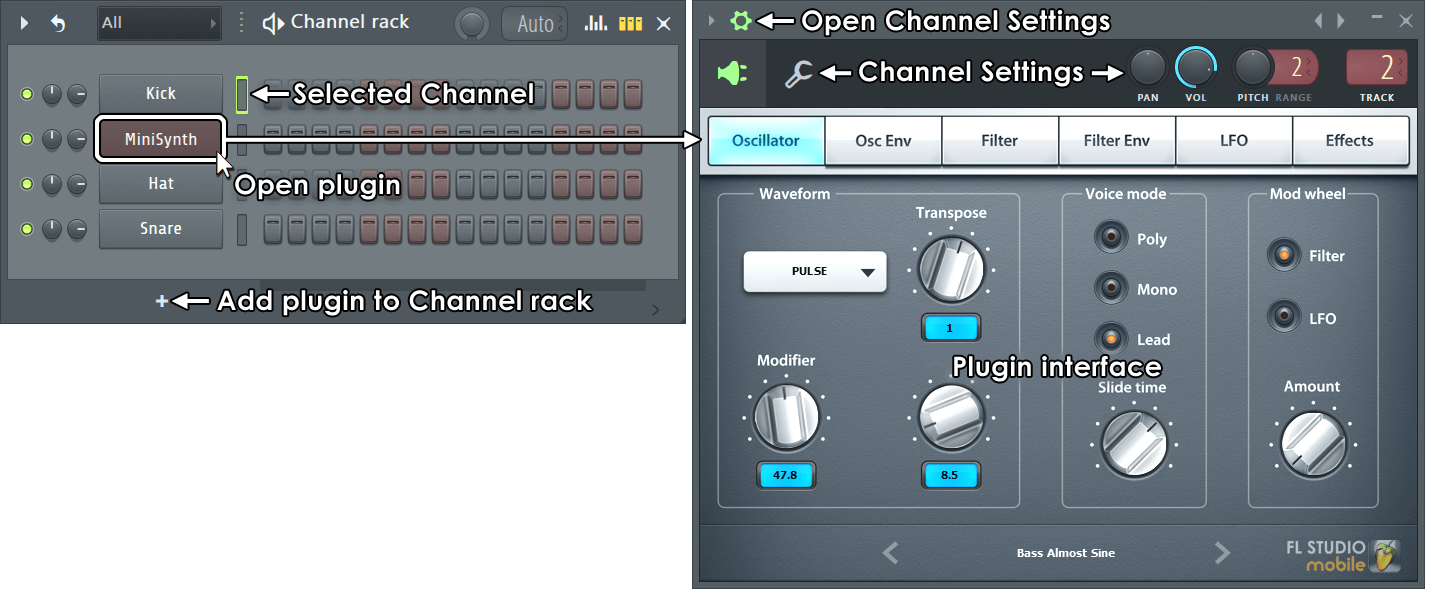
Working with Instrument Channels
NOTE: When working with VST / AU plugins there are a number of useful options under the Wrapper Settings & Processing tabs.
Adding an instrument to a project
There are several ways to add a new instrument:
- Use instrument tracks - Drag the preset from the Browser or Plugin Picker database ((F8)) to a Playlist Track header OR Right-click a Playlist Track header and choose a plugin instrument to associate with the track. This will link the Instrument Channel, Playlist Track (including a default Pattern) through to a Mixer track. See here for more details.
- Use the plugin picker - Open the Plugin Picker database ((F8)) and double-click an instrument OR drag to a Mixer track and the instrument will be routed to this track and the Mixer track auto-named after the plugin.
- Use the 'Add plugin to rack' (+) button - As shown above.
- Add a new instrument channel - Use the Add menu.
- Replace an existing instrument channel - Right-Click on a Channel Button and select 'Replace >' from the pop-up context menu.
- Insert a new instrument channel - Right-Click on a Channel Button and select 'Insert >' from the pop-up context menu. The new Channel will be added above the Channel.
- Drag or send an instrument preset from the Plugin Database - Drag the preset from the Browser to the Channel Rack OR drag a preset to a Mixer track and the instrument will be routed to this track and the Mixer track auto-named after the plugin OR right-click the preset and select 'send to selected channel'.
NOTE: FL Studio includes only the DEMO VERSIONS of some instruments. Trial plugins show '(Trial)' on their wrapper title. You can purchase the full versions of these instruments at www.image-line.com.
How to see more than one Instrument at a time
To open multiple plugin interfaces - Hold (Alt)/(option) and click the Channel's Button on the Channel Rack. Keep doing this for each new instrument you wish to remain simultaneously visible. Alternatively, click the LED icon of the Channel you wish to remain open and then click the new Channel button. To disable the auto-close interface behavior you can also deselect the F10 General settings option Auto select linked modules.
Playing Instrument Channels with a Controller
If you have a keyboard or other controller this can be used to play/control Instrument Channels. FL Studio listens in 'Omni' mode so any connected controller will play the selected channel. If you have more than one controller you can use these to simultaneously play separate instrument channels. For information on how to do this see Controllers and Instrument Channels
Installing new instruments
The manual section on 'Installing VST & AU Plugins' covers the step-by-step procedure for adding new plugins to FL Studio. A wide range of plugin standards are supported by FL Studio.
VST / AU Effects: FL Studio installs with a generous suite of high-quality instruments so there is no need to purchase anything else in order to produce professional quality tracks. However the internet is bursting with instrument plugins, a great place to start is www.kvraudio.com.
The Plugin database & Plugin picker
The Browser contains a special Plugin database folder that works in conjunction with the Plugin picker to help you organize and retrieve plugins based on a visual display.
Instrument / Generator Plugins
This section contains links to the help for all instrument plugins that are installed with FL Studio.
All Instruments Introduced
Instrument Plugins by Name
See also: Effects - Learn more about Effects (reverb, chorus, etc.) in FL Studio.
Instrument Plugins by Category
Automation
Automation Clip Generator - Holds automation shapes for display in the Clip Track area of the Playlist.
Fruity Envelope Controller - Play back user-specified envelopes as a control source.
Fruity Keyboard Controller - Use MIDI performances as a control source.
Fruity Vibrator - Use force-feedback devices as control sources.
Sample Playback/Manipulation
Audio Clip Generator - Holds recorded audio.
BooBass - Bass guitar simulation.
Channel Sampler - Basic single sample playback channel.
DirectWave - Advanced sampler.
FLEX - Advanced preset based synth.
FL Keys - ROMpler.
FPC - Advanced Drum Sampler.
Fruity Granulizer - Sample based granular synthesizer.
Fruity Slicer - Slices samples for playback (particularly useful for drum loops).
Fruity SoundFont Player - SoundFont ROMpler.
Groove Machine - Sampler/Synthesizer Groove Box.
Slicex - Advanced sample slicer.
Wave Traveller - Sample warper and slicer.
Synthesis
3x Osc - Subtractive 3 Osc synth.
Autogun - Additive synthesis.
BassDrum - Percussion modeling.
BeepMap - Image based synthesis.
Drumpad - Percussion modeling pad.
Drumaxx - Percussion modeling instrument.
FLEX - Advanced preset based synth.
FL Slayer - Electric guitar simulation.
Fruit Kick - Kick simulation.
Fruity DrumSynth Live - Percussion Synthesis.
Fruity DX10 - Basic FM Synth.
Groove Machine - FM/RM Synthesizer, Sampler, Groove Box.
Groove Machine Synth - FM/RM Synthesizer.
Harmless - Additive synthesis.
Harmor - Additive synthesis, Image synthesis & Resynthesis
Kepler - Vintage synth emulation.
MiniSynth - Subtractive synthesis stolen from FL Studio Mobile
Morphine - Additive synthesis.
Ogun - Additive synthesis.
Plucked! - Plucked string modeling synth.
PoiZone - Subtractive synthesis.
Sakura - String modeling synthesis.
Sawer - Subtractive synthesis.
SimSynth - Subtractive synth.
Speech Synthesizer - Talking synthesizer.
SynthMaker - It's anything you want it to be!
Sytrus - Advanced FM/RM/Subtractive/Hybrid synth.
Toxic Biohazard - FM synthesis.
Transistor Bass - Subtractive synthesis.
Wasp - Subtractive synth.
Wasp XT - Subtractive synth.
Tools
Buzz Generator Adapter - Adapter to host Buzz instruments.
Control Surface - Design your own internal controllers.
Patcher - Chain instruments & effects.
Channel Settings - Channel settings controls.
Fruity Dance - FL Chan visual effect, Kawaii!
Dashboard - Design your own internal controllers
Fruity Wrapper - Hosts VST & AU plugins.
Fruity Video Player - Play videos in sync with FL Studio Projects.
Layer Channel - Stack channels to play in unison.
MIDI Out - Control MIDI hardware and/or VST / AU plugins
ReWired - Host any compatible ReWire device in FL Studio
VFX Sequencer - Advanced sequencing plugin. Use in Patcher.
All Tools and Editors Introduced
This video introduces all Audio Editors, Automation Controller and creative Tools in FL Studio.