EFFECTS
Effect Plugins
FL Studio has a large number of high quality Effects (FX) at your disposal. Each Mixer track can hold up to 10 plugin effects, however you can add an instance of Patcher and add any number of effects to that OR route one Mixer track to another if you need more FX in the chain. If you are new to music production then getting to know how effects work and which situations they are best suited for may take some time. Using FX successfully is a 'craft', so you'll need to be patient in order to get the best results. The three most common effects in modern music production are 'EQ', 'reverb' and 'compression'. Learning about these three first should give you a good start.
A  video tutorial
on using FX is available on the FL Studio website.
video tutorial
on using FX is available on the FL Studio website.
Working with Effect Plugins
This section explains general Effect Plugin operations. NOTE: When working with VST/AU plugins there are a number of useful options under the Wrapper Settings & Processing tabs.
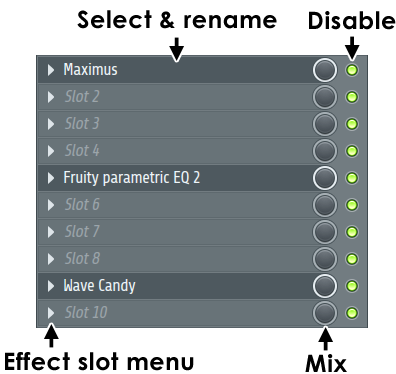
Name (Label) - Left-click to open plugin, Right-Click to rename slot.
Disable - This disables the effect but does not mute the sound passing through the slot (automatable).
Effect slot Menu- Select an effect to load from the pop-up menu.
Mix Level - NOTE: Normally leave this at 100% and control the Wet/Dry mix from within the plugin. If the plugin introduces a processing delay, most do, then the processed 'wet' and unprocessed 'dry' signal can phase cancel as the wet slightly lags the dry signal. This is usually most apparent on high frequencies such as cymbals. Summary? Don't touch that knob! Unless you know what you are doing and since you are reading this you probably don't, so...
All audio is passed through the FL Studio Mixer. Each instrument has a channel settings window that contains a mixer track selector that directs its output to one of the 99 insert mixer tracks. Each mixer track processes the sound with a set of integrated effects, and up to 8 additional effects. To learn more about the mixer structure and functionality, click here.

How to add an effect
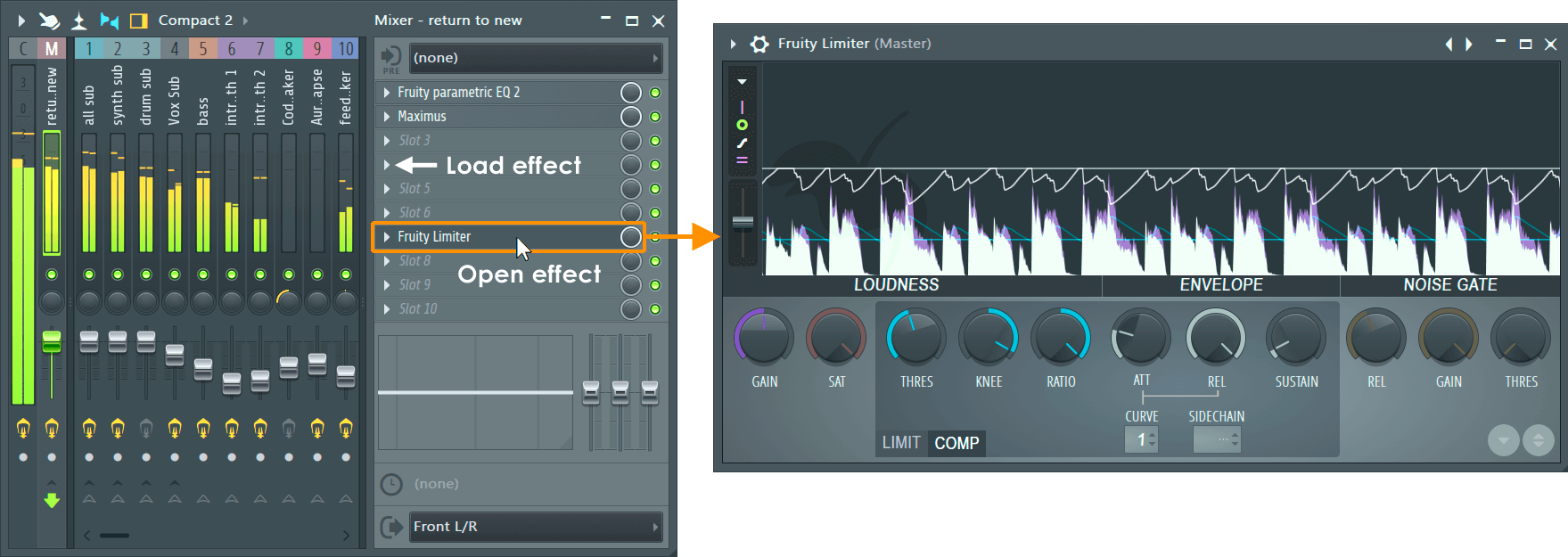
- From the Mixer Track FX slot click on the Load effect menu. Select the effect from the pop-up menu. Effects can be re-ordered at any time by hovering your cursor over the effect slot and scrolling the mouse-wheel up/down.
- Drag a preset from the Plugin Database - Drag the preset from the Browser to the Mixer track OR Mixer track FX slot.
- Use the plugin picker - Open the Plugin Picker database (F8) and drag the plugin to the desired Mixer track or FX slot.
For more detailed help on working with the effects slots click here.
Installing new effects
Click here to see the manual pages on installing new effects plugins. FL studio supports a wide range of plugin standards.
VST/AU effects: FL Studio installs with a complete kit of high-quality effects so there is no need to purchase anything else in order to produce professional quality tracks. However the internet is bursting with VST/AU plugins, a great place to start is www.kvraudio.com.
The Plugin database & Plugin picker
The Browser contains a special Plugin database folder that works in conjunction with the Plugin picker (F8) to help you organize and retrieve plugins based on a visual display.
Effect Plugins
This section contains links to the help pages for all effect plugins that are installed with FL Studio.
NOTE: FL Studio includes only the TRIAL VERSIONS of some effect plugins. Trial effects show '(Trial)' on their wrapper title. You can purchase the full versions of these instruments at www.image-line.com.
All Effects Introduced
Effect Plugins by Name
See also: Instruments & Generators - To learn more about Generators/Instruments/Synths in FL Studio.
Effect Plugins by Category
Automation
Fruity Formula Controller - Define your own controller functions using mathematical formula.
Fruity Peak Controller - Generate controller data based on audio input and LFO settings.
Fruity X-Y Controller - Control two parameters simultaneously with your mouse.
Compression / Dynamics
Fruity Compressor - Control volume peaks and fatten sounds.
Fruity Limiter - Single-band maximizer, compressor and limiter.
Hardcore - Multi-effect guitar rack.
Maximus Multiband Maximizer - Heavy weaponry for the loudness war.
Fruity Multiband Compressor - Control volume peaks and fatten sounds in three independent frequency bands.
Fruity Soft Clipper - Easy-to-use volume limiter.
Soundgoodizer - It's shiny, it's good!
Transient Processor - Control attack and release dynamics.
Delay/Echo
Fruity Delay - Create echoes.
Fruity Delay 2 - Create echoes with echo filtering options.
Fruity Delay 3 - Create tempo synced echoes as BPM changes, with filtering options.
Fruity Delay Bank - Create complex echoes and filtering.
Effector - 12 Multiple performance oriented effects.
Hardcore - Multi-effect guitar rack.
Multiband Delay - Delay frequency bands individually for creative effects.
Distortion
Distructor - Multi-model, multi-fx distotion.
Fruity Blood Overdrive - Create distorted guitar effects.
Fruity Fast Dist - Easy-to-use distortion plugin.
Fruity Squeeze - A Bit-reduction and sample skipping plugin.
Fruity WaveShaper - Define your own distortion curves.
Effector - 12 Multiple performance oriented effects.
Hardcore - Multi-effect guitar rack.
Equalization (EQ)
Edison Equalize Function - Envelope-based EQ
Fruity Convolver - Phase linear EQ (activate from presets)
EQUO - Graphic EQ
Fruity 7 Band EQ - Seven 'tone controls' at fixed frequencies.
Fruity Bass Boost - Specialized bass EQ plugin.
Fruity Parametric EQ - Control bandwidth and target frequency of EQ bands.
Fruity Parametric EQ2 - Control bandwidth and target frequency of EQ bands in style!
Hardcore - Multi-effect guitar rack.
Fruity Delay Bank - Filter delays and echoes.
Fruity Fast LP - Easy-to-use low pass filter which cuts high frequencies.
Fruity Filter - Easy-to-use filter.
Fruity Free Filter - Easy-to-use variable state filter.
Fruity Love Philter - Advanced filter plugin.
Fruity Vocoder - Sound like a robot or make a synth 'talk'.
Vocodex - The last word in vocoding.
Effector - 12 Multiple performance oriented effects.
Hardcore - Multi-effect guitar rack.
Fruity Chorus - Create multiple detuned copies of the original sound, adding depth and weight.
Fruity Phaser - Make sounds like a jet passing at high altitude (phase cancelling).
Fruity Flanger - A more intense version of Fruity Phaser.
Fruity Flangus - Advanced flanger effect.
Effector - 12 Multiple performance oriented effects.
Hardcore - Multi-effect guitar rack.
Hyper Chorus - Extreme Chorus effects.
Vintage Chorus - 'Juno 6' style chorus.
Vintage Phaser - Modelled after the Electro-Harmonics™ 'Small Stone Phaser'.
Edison Convolution Reverb - Apply real-space acoustic fingerprints to audio (non realtime).
Effector - 12 Multiple performance oriented effects.
Fruity Convolver - 'Borrow' rare and exotic recording locations and use their sound as your own.
Fruity Reeverb - Simulate acoustic spaces such as a concert hall or bathroom.
Fruity Reeverb 2 - An even better way to simulate acoustic spaces.
LuxeVerb - Advanced algorithmic reverb.
Hardcore - Multi-effect guitar rack.
Control Surface - Design your own internal controllers.
Edison - A wave editor.
Frequency Shifter - Distort frequencies, create dissonant, metallic or modulated sounds.
Frequency Splitter - Split and process audio into two or three bands.
Fruity Balance - Position sounds in the stereo field.
Fruity Big Clock - Show the bar/beat/time of the song.
Fruity Center - Remove DC offset from waves/plugins.
Patcher - Chain instruments & effects.
Fruity dB Meter - Show volume in a nerdy way.
Fruity HTML NoteBook - Make notes in your project using HTML synced to the playback position.
Fruity LSD - Access the synthesizer built into your computer.
Fruity Mute 2 - Turn noises off.
Newtime - Time warping and correction.
Newtone - Pitch editor and correction.
Fruity NoteBook - Make notes in your project synced to the playback position.
Fruity PanOMatic - Move sounds in the stereo field automatically.
Fruity Phase Inverter - Invert the direction of a wave relative to the original.
Pitcher - Pitch correction and harmonization.
Pitch Shifter - Alter the pitch and formant of input audio.
Fruity Scratcher - Simulate turntables.
Fruity Send - Siphon a sound from any point in the FX chain to a 'send' track.
Fruity Spectroman - See what your sounds look like (sonograph).
Fruity Stereo Enhancer - Simulate or enhance stereo effects.
Fruity Stereo Shaper - Mid/Side stereo enhancer.
Fruity Wrapper - Integrate VST/AU FX with FL Studio.
Gross Beat - Play with time (scratching, stuttering, glitch, gating, etc).
SynthMaker - Tool for making your own Effects.
Tuner - Instrument tuning plugin.
Wave Candy - A flexible audio analysis and Visualization tool.
ZGameEditor Visualizer (free) - Visualization effect with movie render capability.
This video introduces all Audio Editors, Automation Controller and creative Tools in FL Studio.
Phasing/Flanging/Chorus
Reverb
Tools
Visual
All Tools and Editors Introduced