INSTRUMENTS / GENERATORS
Slicex 
Slicex uses advanced beat detection algorithms to slice song/percussion samples into pieces and make them independently playable from the Piano roll or controller. If the wave file contains slice/region
data this will be automatically used instead of the beat-detection algorithm. Slicex offers playback, reordering of slices and time-stretching capabilities optimized for drum loops. Related plugins are the Fruity Slicer and
Edison. Tutorial videos  here.
here.
Video Tutorial
Using Slicex
This section is a quick-start guide to using Slicex and covers some of the most common issues new users encounter.
Quick start
Answers to common questions people want to know about using Slicex:
- To play a region (slice) use the Keyboard panel, the Piano roll or an external controller. If you Right-click a region this plays the raw audio without any articulation settings, so it may sound different to the Keyboard/Piano roll method.
- Typing Keyboard Priority must be selected for Slicex keyboard shortcuts to work. It's off by default so the typing-to-piano kb can be used to test your slices.
- To play the whole slice regardless of how long the slice key is held, load Vol - sustaining.fnv in the VOL and ENV mapping for the linked articulator.
- To use an ADSR envelope select the slice with the Region selector on the Articulation Panel, assign the AMP to an articulator and then load a state for that Articulator from the Envelope's Options Menu (small down-arrow next to the FREEZE selector, lower right)
- To play to end like in Fruity Slicer, Run script > Regions > Play to end. NOTE: The play to end is not compatible with low-tempo drumloops or fill-gaps.
Manipulating Regions (Slices)
- Loading samples & loops - Slicex can load and slice two independent samples/loops into decks A and B (accessed from the Wave Editor).
After opening Slicex there are several ways to load a sample:
- Drag samples from the Browser and drop them onto the plugin channel or interface. NOTE: Appending samples - Holding Shift + Dragging from the Browser will append the new sample or slices to the existing data. Replacing samples - Drop samples on a Slice Marker name.
- Click on the grey Slicex logo that shows on the left side of the Articulation panel (prior to loading a sample).
- Click on an empty Wave editor window to open a file browser.
- Click on the File icon on the Wave editor to open a file browser.
Slicex will then load and automatically slice loaded samples (deck A is used unless the sample is deliberately dropped on deck B).
- Manual tempo setting using a selection - You can improve many auto-slicing functions by manually setting the tempo properties of the sample. Highlight a part of the audio that you know to be an exact # of beats, then the properties dialog (F2) will show 'Selection (beats)' instead of 'Length (beats)'. If 4 beats were highlighted (for example), enter 4, and the tempo of the song should be detected.
- Manual grid/tempo alignment using downbeat - As some options slice according to the background grid, you may want to try manually aligning the grid to the beat. Right-Ctrl + Right-Shift + Click on the location in the sample where the first downbeat marker is to be set, hold and drag horizontally to fine-tune the position if needed. Then, release the mouse button and click again with the Right-Ctrl + Right-Shift keys still held (drag left/right) to adjust the grid spacing to align the grid to the beat.
- Perfecting slices - After loading the sample/loop there are two possibilities depending on the sample/loop that was loaded:
The gaps between slices are pre-filled. Pre-made Slicex loops and REX files will often be ready to play without further processing (if the author knew how to make a correctly sliced loop).
Gaps or clicks can be heard between slices. In this case, start by adjusting the slice points manually (if needed). Clicking on the small tab at the top of the slice markers and moving them appropriately, this may solve your problems, if not then try:
- Tools > Regions > Declick out all regions OR
- Tools > Regions > Perfect all regions depending on what sounds best. Declick out is usually better than 'perfect' for drumloops, as it only smooths the decay portion leaving the attack transients untouched. OR
- Tools > Time > Drum(loop) stretch can be done globally, or per-slice for more accuracy. This methods overwrites the original sample data (a destructive edit), explaining why it is not done automatically. The stretch method is best used when drum sounds are already cut too short and you can't afford losing even more of the decay de-clicking slices.
NOTE: Slicex's own sampler has a real-time declicker, but if the decay is already short, Slicex can't do magic.
- Layering slices - Slicex has a range of powerful layering tools that will give your sliced loops the creative edge. Right-click a slices region-marker tab and select 'Trigger note', then select your piano key. Once you assign another slice to the same key the layering options on the Master panel will provide more creative options.
- Editing samples - Slicex includes a Wave Editor with all the power of Edison, so you can edit, mangle, process and tweak slices to perfection.
- Express yourself - Programmed variations are the key to expressive control and Slicex has infinite variation as a design principle. Any number of regions, within and between decks, can be layered/crossfaded using the settings on the Master Panel. Region slices may be assigned to any or all keys. All the while, these samples and layers are under the control of the articulator section that includes filters, envelopes, LFOs and more.
- Think outside the loop - Yes, Slicex is the perfect loop/beat slicer and percussion powerhouse however, Slicex will process any source audio with equal ease - why not try it on melodic parts, vocals, guitar tracks or whole songs! The creative and sonic possibilities are endless.
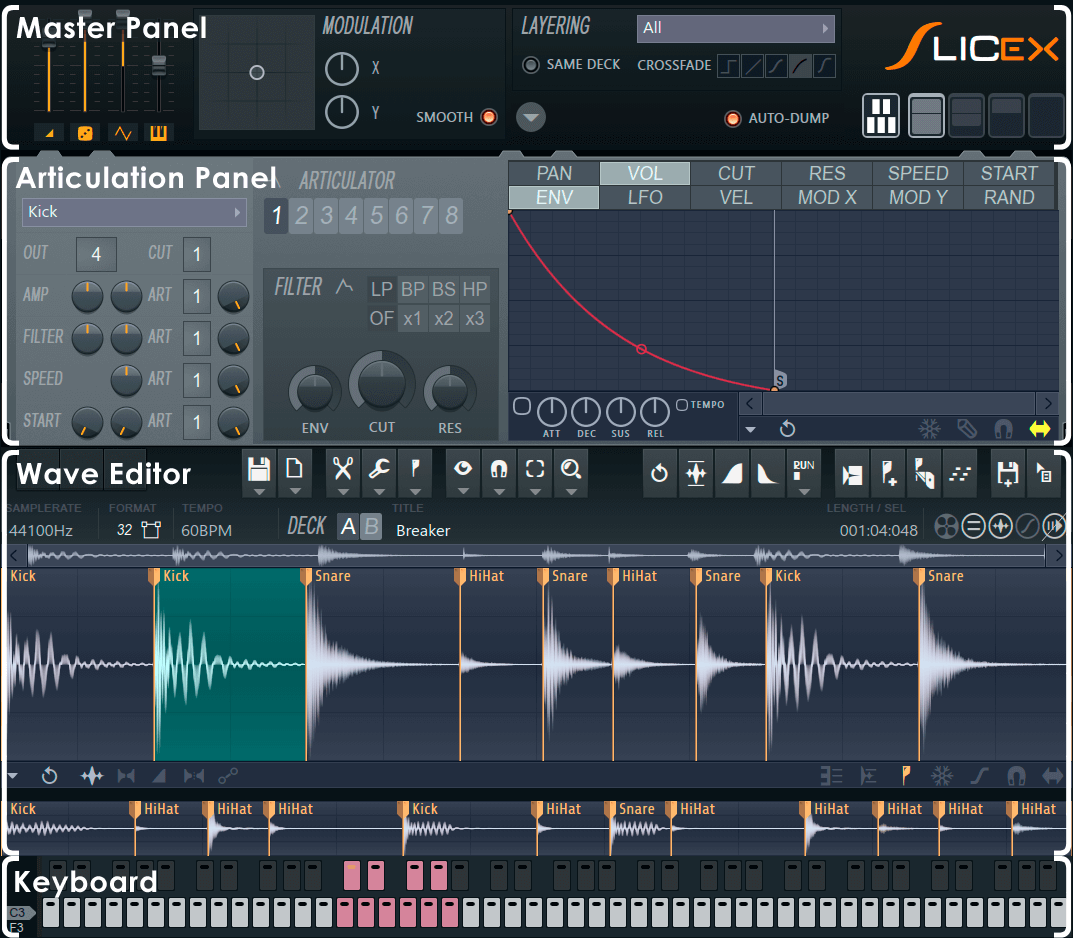
For details on each section click on the heading below:
Master Panel
Articulation Panel
Wave Editor
Keyboard & Piano roll Controls
Plugin Credits -
Code & GUI: Didier Dambrin.