INSTRUMENTS / GENERATORS
Slicex - Keyboard 
Slicex uses advanced beat detection algorithms to slice song/percussion samples into pieces and make them independently playable from the Piano roll or controller. If the wave file contains slice/region
data this will be automatically used instead of the beat-detection algorithm. Slicex offers playback, reordering of slices and time-stretching capabilities optimized for drum loops. Related plugins are the Fruity Slicer and
Edison.
Master Panel
Articulation Panel
Wave Editor
Keyboard & Piano roll Controls
Keyboard controls
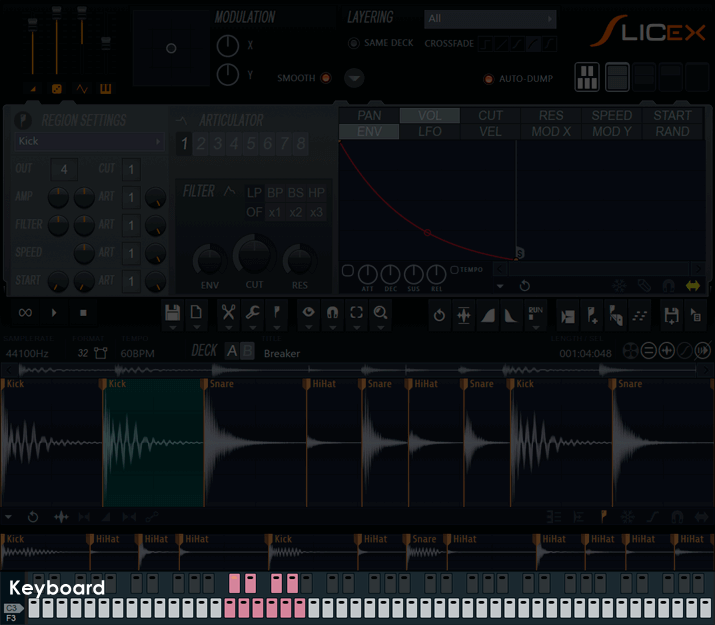
Use the keyboard to preview & assign sliced regions to notes. This display simulates a Piano keyboard using stepsequencer-like pads in the place of keys. The region to key assignments set here affect how Slicex will respond to external note input also. NOTE: While the keyboard may look like the stepsequencer, it does not function as one, it is a preview keyboard only.
- Range selectors - Down the left side are a series of switches starting at C0 to F3.
- Using keys - Left-click a key to sound the associated region. Right-click a key to open an assign options:
- Assign current region to this key - Assigns the selected region to the key Right-clicked.
- Select region assigned to this key - Selects the region assigned to the key Right-clicked.
- Assigning keys & layers
The assigned keys display in...ummm...well I'd like to say some 'manly' color like red, but there is no way around this...the active range displays in 'pink'. Apologies to our female users who believe it's 'tea rose'. The author (being male) sees only in 'real colors'.
To create layers assign more than one slice region to the same note. Assignments may be made from within or between decks A and B. There are a number of crossfade curve and layer options on the Master panel.
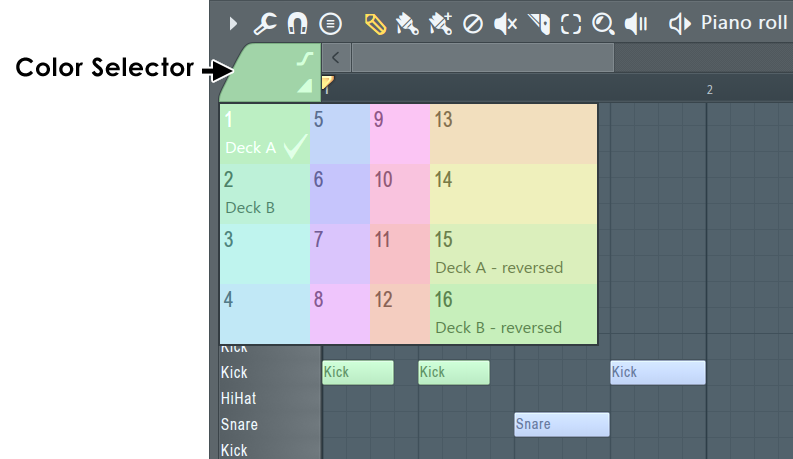
Piano roll deck control
The Piano roll note colors can be used to control Decks 1 & 2 independently. As shown below ODD note colors (1,3,5,7,9,11,13 & 15) play Deck 1 and EVEN note colors (2,4,6,8,10,12,14 & 16) play Deck 2. Colors 15 & 16 are special 'reverse playback' colors. Remember that note colors represent MIDI channels 1 to 16 so you can access the same functionality from a properly configured MIDI controller.