WAVE EDITOR / RECORDER
Edison 
Edison is a fully integrated audio editing and recording tool. Edison loads into an effect slot (in any mixer track) and will then record or play audio from that position. You may load as many instances of Edison as you require in any number of Mixer Tracks or Effects slots. To open Edison press Ctrl+E in a Sampler Channel, or load from the effects menu into mixer track/s.
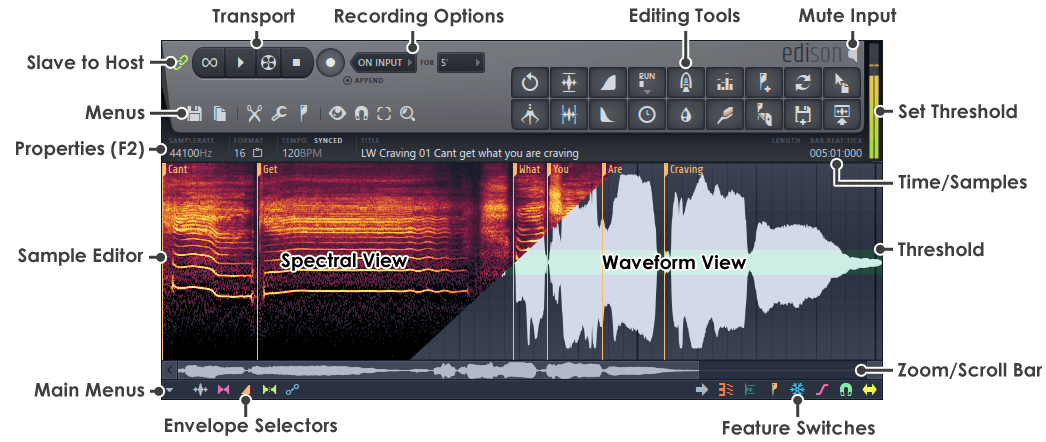
Transport Controls
Recording Options
Menu Buttons
Sample Edit Functions
Special Controls
Peak Meter
Sample Edit Window
Main Menu
Envelope Selector
Feature Switches
Zoom/Scroll Bar
Time/Sample Display
Sample Properties (F2)
This area displays the sample properties including: Sample rate, Bit depth, Channel format, Tempo information and Title. Some items are clickable, as noted below:

- Samplerate (Information) - Sample rate for the loaded sample.
- Format (Clickable) - There are two options:
- Bit depth - Click to change between 16 and 32 Bit. NOTES: Operations that affect amplitude will automatically change samples from 16 to 32 bit to preserve fidelity. When converting from 32 > 16 Bit, this is a lossy operation. You can use (Ctrl+Alt+Z) to undo.
- Channels
 - Click to covert to Mono (single channel sample). NOTE: Converting from Stereo to Mono is a lossy operation. Information is lost. Use (Ctrl+Alt+Z) to undo.
- Tempo (Information) - Embedded tempo.
- Synced / Free (Clickable) - Controls the background grid in Edison. When Synced the grid reflects FL Studio's tempo. When Free, the grid will snap to the samples tempo.
- Title - Sample title.
- Right-clicking this area or pressing F2 opens the Sample Properties dialog as shown below.
To open the Sample properties dialog
Select  > Edit properties OR press (
F2) with Edison focused.
> Edit properties OR press (
F2) with Edison focused.
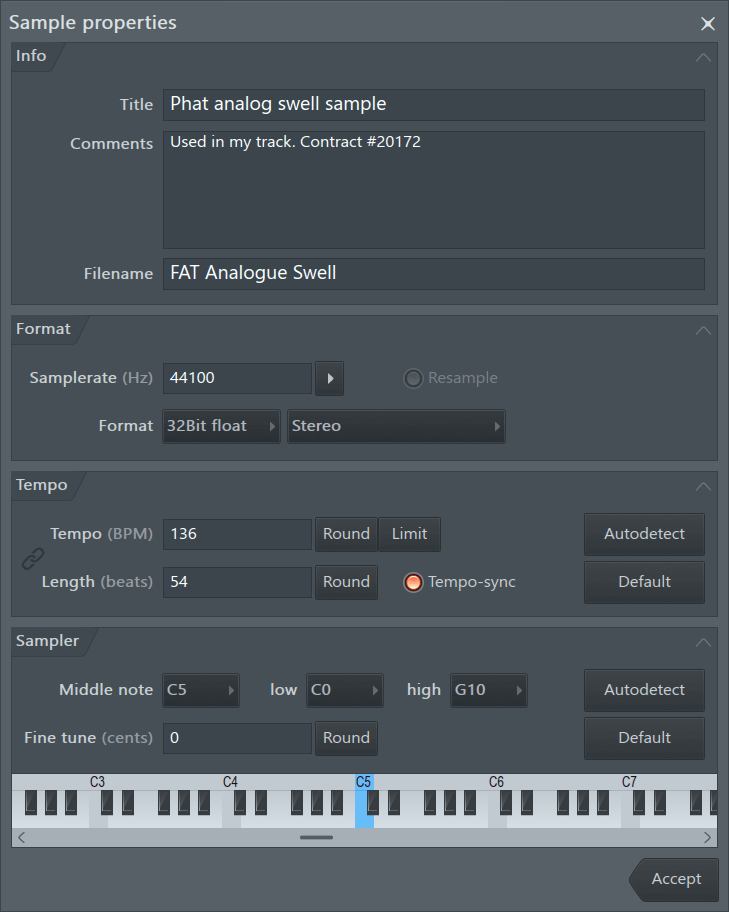
Info
- Title - Names the sample.
- Comments - These comments will show in the sample properties.
- Filename - Change or set the file name for the sample. NOTE: If you change a samples file name, the original file/sample will be used in any existing projects.
Format
- Sample rate (Hz) - Sets the sample rate.
- Resample (switch) - Selecting this switch forces resampling of the sample data to the desired samplerate. If this switch is off the sample rate changes only the playback sample rate (speed) without modifying the data. For example, choose to either resample data to 22kHz (data reduction), or to play existing data at 22kHz (pitch-shift).
- Format - Choose between 16-Bit integer & 32-Bit floating point formats. Mono or Stereo.
NOTE: Edison automatically converts data to 32-Bit before applying any function that modifies the sample data. It is better to apply several edits in 32-Bit floating point, than convert to 16-Bit integer after each edit.
Tempo
- Tempo (BPM) - Sets the tempo in Beats Per Minute. If 'tempo-sync' is selected, setting a tempo here will cause FL Studio to stretch/pitch-shift the sample according to this value when loaded.
- Round - Rounds the tempo (removes decimals).
- Limit - Corrects any double/half tempo problems (range options appear when the button is selected).
- Length (beats) / Selection (beats) - Enter the number of beats in the sample or selection. 'Sel (beats)' appears if a selection has been made (enter the number of beats in the selection).
Used when slicing & beat detecting (see below).
- Round - Rounds the number of beats (removes decimals).
- Tempo-sync - When selected - Instructs FL Studio to stretch (beatmatch) the sample to the Master tempo of the project (Audio clips & Channel sampler). The F10 General Settings, 'Read sample tempo information' option MUST BE ON. See the section on Time-stretching & Pitch-shifting in the Sampler Channel Settings section for more details. NOTE: When the option is selected, and nothing is set in the field, the host tempo will be used. Left-click in the field to manually enter a tempo.
Manual tempo setting - The manual tempo detection technique is to highlight a part of the audio that you know to be an exact number of beats, then the properties dialog (F2) will show 'Selection (beats)' instead of 'Length (beats)'. If 4 beats were highlighted (for example), enter 4, and the tempo of the song should be detected.
Manual grid alignment - Right-Ctrl + Right-Shift + Click on the location in the sample where the first downbeat marker is to be set, hold and drag horizontally to fine-tune the position if needed. Then, release the mouse button and click again with the Right-Ctrl + Right-Shift keys still held (drag left/right) to adjust the grid spacing to align the grid to the beat.
- Default - Sets the BPM to the FL Studio project tempo.
- Quick guess - For songs with a constant tempo.
- Autodetect - Select to choose from three options:
- Quick estimation for short loops - Quick tempo-detection based on the host tempo and the length of the sample.
- Detection for songs with constant tempo - Algorithmic tempo-detection which generally gives the most accurate result, but requires constant tempo tracks.
- Detection for songs with variable tempo - Algorithmic tempo-detection tuned for songs without a constant tempo.
Sampler
These functions aid samplers that read meta-data to auto-process the sample (DirectWave and the Channel sampler for example).
- Middle note (root note) - Selects the MIDI note at which the sample will play back at the original (recorded) pitch. This data is used by samplers such as DirectWave and the Channel Sampler to automatically set the 'root' note.
- low - Sets the lowest intended MIDI note the sample should play on.
- high - Sets the highest intended MIDI note the sample should play on.
- Fine tune (cents) - Fine-tunes the intended pitch of the sample in 1/100ths of a semi-tone.
- Default - Restores default settings.
- Autodetect - Auto-detects the pitch of the sample. Use on monophonic single-pitch sounds only.
end